Aqara

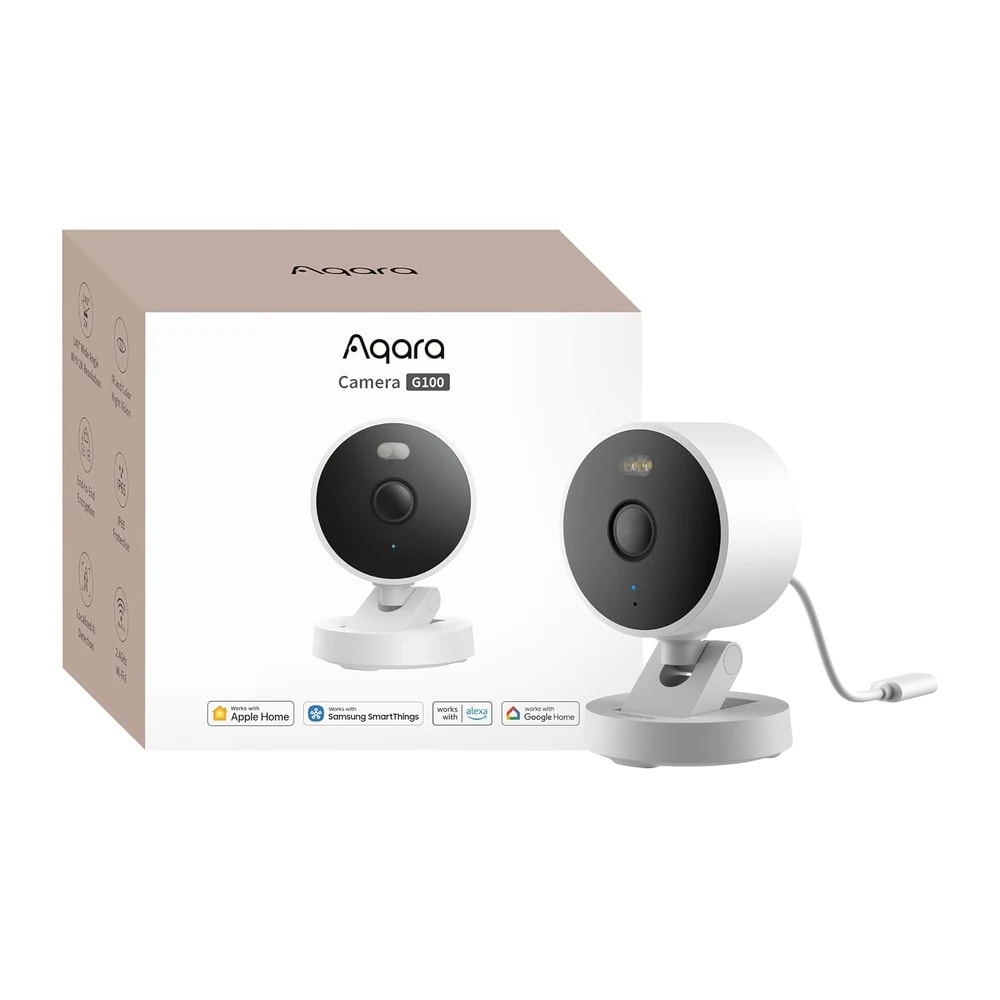
Aqara Camera G100

A cheap 2K camera for an Apple household in Dubai, as long as it goes indoors or under a shaded soffit, because Aqara only rates it to 40 C.

Wi-FiBluetoothBudget
Works with
Apple HomeAmazon AlexaGoogle HomeSmartThingsAqara Home
AED 217.91
AED 217.91 on Amazon.ae for the white version, sold by TECH MIDDLE EAST TRADING LLC, delivered by Amazon.ae and in stock when checked on 23 September 2026. The black version was AED 237.00 on the same page, and Noon listed the black one at AED 259. No power adapter and no microSD card are included, so budget for a 5V 1A UK Type-G plug and a card.

Typical Amazon.ae price for the device, checked 23 Sept 2026. See the listing Installation is quoted separately once we have checked your property.

Enquire on WhatsApp
Enquire on WhatsApp

Fitted for you and configured by our Dubai team. We check compatibility with your property before you commit to anything.

Overview

What it is and where it fits

At AED 218 the Aqara Camera G100 is the cheapest honest route into HomeKit Secure Video in Dubai. It suits an Apple household that wants a 2K camera indoors, or outdoors in full shade. It is not a camera for a sun-facing wall. Aqara rates it from minus 10 to 40 C, and a Dubai wall in direct sun passes 40 C for months of the year, so plan a north-facing, soffit or balcony-ceiling position, or keep it inside. Everything else is generous for the money. It films at 2304 x 1296 through a 140 degree f/1.8 lens, with 940nm infrared for covert night video and a spotlight for colour. Motion and person detection run on the camera. Recording goes to a microSD card of up to 512GB, to a NAS, or to iCloud through HomeKit Secure Video, and none of those needs an Aqara subscription. RTSP output covers Home Assistant. The catches are worth knowing. It is mains powered with no battery, the 5V 1A plug is not in the box, and it joins 2.4GHz Wi-Fi only. HomeKit caps the stream at 1080p, and holds the Aqara app at 1080p while both are connected. Pet, vehicle, package and face recognition sit behind Aqara's HomeGuardian plan. It needs no Aqara hub, and it is not a hub itself, unlike the G5 Pro.

  • Records to your own microSD card or NAS, with no Aqara subscription
  • Works in Apple Home with HomeKit Secure Video, and streams to Alexa and Google displays
  • Motion and person detection run on the camera, not in a paid cloud tier
  • RTSP output, so it feeds Home Assistant or a third-party recorder
  • IP65 housing takes rain and dust, provided the position stays under 40 C
Technical

Specifications

Model CH-C08E

ModelCH-C08E
Resolution2304 x 1296, 3MP, H.264
Lens and field of viewf/1.8, 140 degrees diagonal
WirelessWi-Fi 802.11 b/g/n/ax 2.4GHz with WPA3, Bluetooth. 5GHz not supported
Power5V 1A DC, power cable included, mains adapter not included
StoragemicroSD up to 512GB Class 10 or above, card not included, plus NAS, RTSP and HomeKit Secure Video
Night vision940nm infrared for black and white, spotlight for colour
Weather ratingIP65
Operating temperature-10 to 40 C, 0 to 95% RH non-condensing
Size and weight58.16 x 58.16 x 72.25 mm, 180 g

In the box

  • Camera G100
  • Power cable
  • Wall bracket
  • Wall screws M3 x 20mm and anchor kit
  • User manual
In Dubai homes

What to check before you order

Read the temperature rating before you decide where this goes. Aqara rates the G100 from minus 10 to 40 C, and that is the single thing that decides whether it suits your Dubai property. Ambient air passes 40 C on most summer days, and a wall or bracket in direct sun runs far hotter than the shade reading. The IP65 shell keeps out dust and rain, which are not the problem here. Heat is. Put it inside, or outside only under a soffit, a deep balcony ceiling, a covered car port or a north-facing elevation that never takes direct sun. A west-facing villa wall will cook it. It is mains powered with no battery, and the 5V 1A adapter is not in the box, so you need a UK Type-G plug on 220V 50Hz and a socket or a discreet cable route to one. That also means it stops during a DEWA cut unless the socket sits on a small UPS. The camera joins 2.4GHz Wi-Fi only, which suits a villa where the 2.4GHz band reaches further through blockwork, but check coverage at the mounting point first. On regulation, a camera covering the inside of your own home is your own business. Dubai's Security Industry Regulatory Agency, SIRA, sets rules for surveillance covering shared and public areas, commercial premises and monitored systems, and those rules call for approved equipment and licensed installers. The G100 is a consumer camera and we have seen no SIRA approval for it, so if the frame takes in a shared corridor, a lobby, a car park or a neighbour's property, check with your building management and with SIRA before you mount it. We can advise on where the line falls. For tenants, drilling into a wall or a soffit needs landlord permission and often a building NOC, so a shelf or sill position indoors is the easier option.

Aqara in the UAE. Sold through several authorised UAE resellers rather than one exclusive distributor. Wide local stock and the broadest single-hub ecosystem available in UAE retail.

Answers

Questions about the Aqara Camera G100

What is the Aqara Camera G100?
Chevron down icon
The Aqara Camera G100 is a small mains-powered Wi-Fi security camera that films at 2304 x 1296 through a 140 degree lens. It has a spotlight for colour night video, 940nm infrared for covert night video, two-way audio and an IP65 weather-resistant housing. It records to a microSD card, a NAS or iCloud through HomeKit Secure Video.
Contact us
Contact us
What is the Aqara G100 price in the UAE?
Chevron down icon
On 23 September 2026 the white G100 was AED 217.91 on Amazon.ae, sold by TECH MIDDLE EAST TRADING LLC, delivered by Amazon.ae and in stock. The black version was AED 237.00 on the same listing, and Noon had the black one at AED 259. Neither price includes a power adapter or a memory card.
Contact us
Contact us
Where can I buy the Aqara G100 in Dubai?
Chevron down icon
Amazon.ae had the lowest in-stock price when we checked, at AED 217.91 for the white version. Noon lists it as well, for more. If you would rather it was mounted, wired to a sensible socket and set up in Apple Home or the Aqara app, supply and installation can be arranged as part of a job.
Contact us
Contact us
Can the Aqara G100 be mounted outdoors in Dubai?
Chevron down icon
Only in shade. Aqara rates the G100 from minus 10 to 40 C, and Dubai summer air alone reaches that, with a sunlit wall running much hotter. Mount it under a soffit, a deep balcony ceiling, a covered car port or on an elevation that never takes direct sun. If you have no shaded position, treat it as an indoor camera.
Contact us
Contact us
Is the Aqara G100 waterproof?
Chevron down icon
It carries an IP65 rating, which means it is dust tight and protected against water jets, so rain and hose spray are not a problem. IP65 says nothing about heat. In Dubai the water rating is rarely the limit and the 40 C ceiling almost always is, so pick the position for shade first.
Contact us
Contact us
Does the Aqara G100 need an Aqara hub?
Chevron down icon
No. The G100 connects straight to your 2.4GHz Wi-Fi and works on its own in the Aqara Home app. It is also not a hub itself, so unlike the Aqara G5 Pro or the G2H Pro it will not run your Aqara Zigbee sensors. If you want Zigbee devices as well, you need a separate hub such as the Aqara Hub M3.
Contact us
Contact us
Does the G100 work with Apple Home?
Chevron down icon
Yes, and it supports HomeKit Secure Video. That needs an Apple Home hub in the house, meaning a HomePod or an Apple TV, and an iCloud+ plan. Apple limits HomeKit Secure Video to 1080p, and while the camera is connected to both Apple Home and Aqara Home the Aqara app stream also drops to 1080p.
Contact us
Contact us
Does it work with Alexa and Google Home?
Chevron down icon
Yes. The G100 streams to Alexa and Google Home smart displays, so you can pull up the live view by voice on an Echo Show or Nest Hub. Aqara also lists SmartThings support, and IFTTT appears on the retail listing. Two-way audio and custom audio files work in the Aqara Home app only.
Contact us
Contact us
Can I use the G100 with Home Assistant or a third-party recorder?
Chevron down icon
Yes. The G100 outputs an RTSP stream, which Home Assistant, Frigate, Synology Surveillance Station and most NVR software can pull in. Aqara states that Zigbee2MQTT and similar third-party dongles are not officially supported, so treat RTSP as the supported route for integration rather than local protocol hacking.
Contact us
Contact us
Is there a subscription for the Aqara G100?
Chevron down icon
Not for the useful parts. Local recording to a microSD card or a NAS, live view, two-way audio, RTSP, motion detection and person detection all work with no payment to Aqara. The HomeGuardian plan adds cloud recording and cloud recognition of pets, vehicles, packages and faces. HomeKit Secure Video needs an iCloud+ plan instead.
Contact us
Contact us
How does the G100 store footage, and how much does a card hold?
Chevron down icon
It takes a microSD card up to 512GB, Class 10 or above, which is not supplied. It can also write to a NAS over your network, or to iCloud through HomeKit Secure Video. A 128GB card is enough for several days of continuous 2K recording on most scenes, and far longer if you record events only.
Contact us
Contact us
Is a power adapter included with the G100?
Chevron down icon
No. Aqara supplies the camera, a power cable, a bracket, screws, anchors and the manual, and states that a DC 5V 1A adapter is needed and is not in the box. In the UAE that means a UK Type-G plug rated at 5V 1A or better for a 220V 50Hz socket. Budget a few dirhams for one.
Contact us
Contact us
Does the Aqara G100 run on batteries?
Chevron down icon
No. It is permanently mains powered through its cable, so every position needs a socket or a cable route to one. If you need a camera on a boundary wall or a gate post with no power nearby, look at a battery or solar model instead, because there is no battery option for the G100.
Contact us
Contact us
Does the G100 work on 5GHz Wi-Fi?
Chevron down icon
No. It joins 2.4GHz networks only, although it supports Wi-Fi 6 and WPA3 on that band. If your router broadcasts one merged network name across both bands, the pairing may fail, and splitting the 2.4GHz band onto its own name during setup usually fixes it. 2.4GHz does carry further through villa blockwork, which helps here.
Contact us
Contact us
How much area does the G100 cover?
Chevron down icon
The 140 degree diagonal field of view takes in a normal room, an entrance, a driveway approach or a car port from a single fixed position. It does not pan or tilt, so aim it once and leave it. Aqara recommends mounting 2 to 3 metres above the ground for wall or ceiling installations.
Contact us
Contact us
What happens in a DEWA power cut?
Chevron down icon
The camera goes off, because it has no battery. Anything on the microSD card stays there and recording resumes when power returns. If you want cover through short cuts, put the camera's plug and your router on a small UPS. Without that, the camera is blind for the length of the outage.
Contact us
Contact us
What happens when the internet goes down?
Chevron down icon
Local recording to the microSD card keeps running, and on-camera motion and person detection keep working. What stops is remote viewing from outside the home, push notifications, voice assistants and any cloud recording on the HomeGuardian plan. On the same local network you can usually still reach the RTSP stream.
Contact us
Contact us
How good is the night vision?
Chevron down icon
There are two modes and you choose one. The 940nm infrared mode gives black and white footage without any visible glow, which is better for covert monitoring. The spotlight mode floods the scene with white light for colour footage, which is better for identifying faces and clothing. Aqara notes that both modes are enabled manually in the app rather than automatically.
Contact us
Contact us
Where should I mount the G100?
Chevron down icon
Indoors, on a shelf, sill or wall with a view of the door or the room. Outdoors, under a soffit, a balcony ceiling or a car port roof, 2 to 3 metres up, and never in direct sun. Aqara warns against pointing the lens at direct sunlight because it can permanently damage the image sensor.
Contact us
Contact us
Is the Aqara G100 good for a rented apartment in Dubai?
Chevron down icon
Indoors, yes. It sits on a shelf, needs only a socket and Wi-Fi, and you take it with you when you move. Anything screwed into a wall, balcony ceiling or soffit normally needs landlord permission and often a building NOC, so use the free-standing option if you would rather not ask.
Contact us
Contact us
Do SIRA rules apply to a camera like this?
Chevron down icon
A camera covering the inside of your own home is your own business. Dubai's Security Industry Regulatory Agency regulates surveillance of shared and public areas, commercial premises and monitored systems, where approved equipment and licensed installers are required. The G100 is a consumer camera and we have seen no SIRA approval for it, so if your frame takes in a shared corridor, lobby, car park or a neighbour's property, check with building management and SIRA first.
Contact us
Contact us
How does the G100 compare with the Aqara G5 Pro?
Chevron down icon
The G5 Pro costs roughly three times as much and is the one to buy for a permanent exterior position. It is rated to 50 C, takes PoE, runs detection on a dedicated AI chip and doubles as an Aqara Zigbee hub. The G100 is a 40 C camera with no hub duty and no PoE. Use the G100 indoors or in deep shade and the G5 Pro at the gate.
Contact us
Contact us
How does it compare with a TP-Link Tapo camera at a similar price?
Chevron down icon
Tapo models in this bracket usually pan and tilt and come with a polished app, but they do not support HomeKit Secure Video. If you are an Apple household and want footage in the Home app on an iCloud+ plan, the G100 is the reason to choose Aqara. If nobody in the house uses Apple Home, a Tapo may give you more movement for the money.
Contact us
Contact us
Who should not buy the Aqara G100, and do you install it?
Chevron down icon
Skip it if the only spot you have is a sun-facing exterior wall, if you need a battery or solar camera with no power nearby, if you want the camera to also run Zigbee sensors, or if you need pan and tilt. Otherwise, yes, it can be mounted and the cable routed to a sensible socket, and we set up recording and add it to Apple Home or the Aqara app. Warranty on an Amazon.ae marketplace purchase normally runs through the seller, so keep the invoice.
Contact us
Contact us
Installation

Fitted properly, set up by our Dubai team

This comes as part of a working system rather than as a box. That means checking it suits your property first, having it fitted properly, setting up the automations that make it useful, and showing your household how it works.

See Security & Surveillance
Chat Now