Lenovo

Lenovo XW1-U Indoor Dual-Lens Pan-Tilt Camera

Lenovo XW1-U indoor dual-lens Wi-Fi camera with two 3MP lenses, one fixed and one turning, for large Dubai living rooms, majlis spaces and open-plan villas.

Wi-FiBudget
Works with
Manufacturer appAmazon Alexa
Price on enquiry
Sourced to order. Ask us for today's price and lead time.
Enquire on WhatsApp
Enquire on WhatsApp

Fitted for you and configured by our Dubai team. We check compatibility with your property before you commit to anything.

Overview

What it is and where it fits

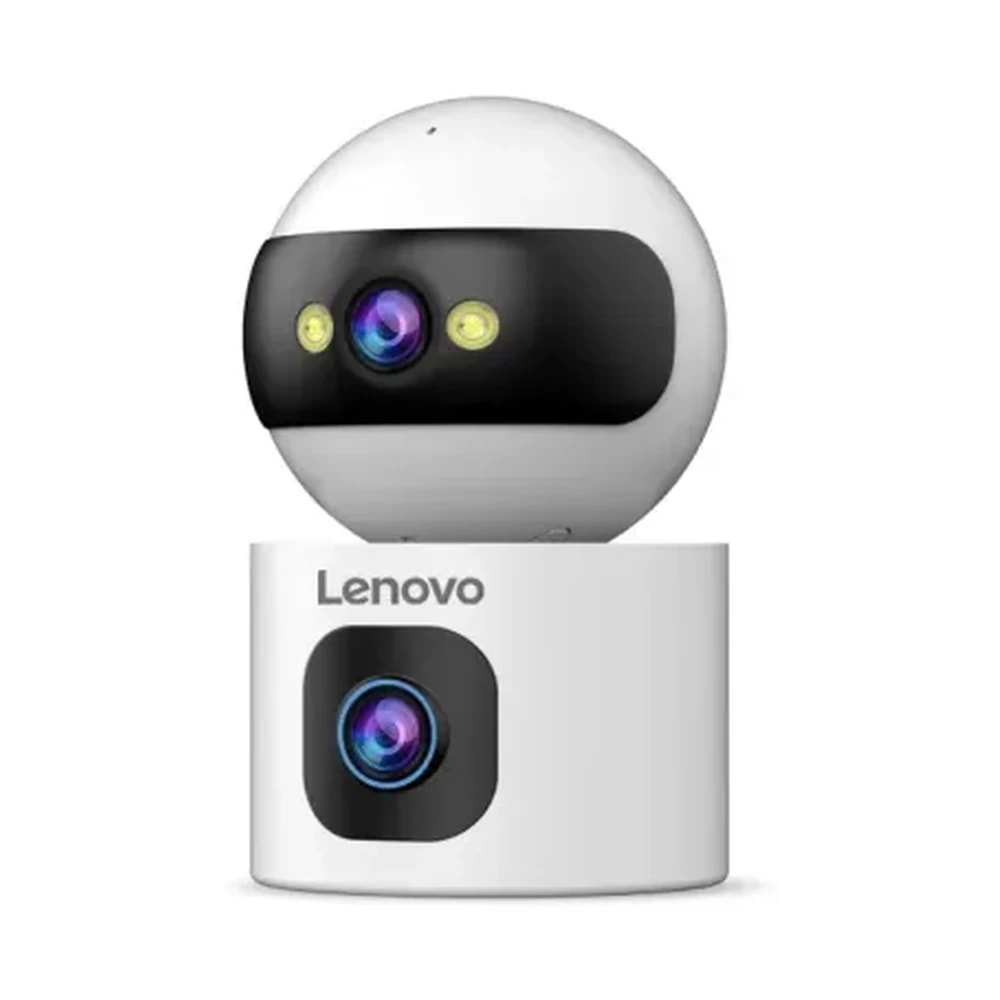
The Lenovo XW1-U is an indoor dual-lens pan-tilt Wi-Fi camera for large Dubai rooms where one view is not enough, such as an open-plan villa living room or a majlis with two entrances. It stacks two 3MP lenses in one body. The lens in the base keeps watching a set spot, while the round head above turns to follow movement. An overseas retailer lists this exact model code, and the figures here come from that listing. The head pans 355° and tilts 90°, infrared night vision reaches about 10 metres, and a microphone with a 1 W speaker allows two-way talk. Motion and sound detection send alerts to your phone and can set off a sound alarm. Video is saved in H.265 to a microSD card of up to 256 GB. Day-to-day control runs through the cam720 app, and Alexa is available through the Cam720 Smart Home skill. What else you need: a power point beside a shelf or cabinet with a clear view of the room, and Wi-Fi that reaches it, since no wired network option is listed. The limits are clear enough. The listing mentions infrared night vision but not colour, while the single-lens Lenovo C35 does list colour. No operating temperature or weather rating is published, so it belongs in rooms that stay air conditioned. And two lenses means two views to aim with care, so that neither one looks into a private space.

  • Two lenses watch a fixed spot and follow movement at the same time
  • Upper head turns 355° and tilts 90° to cover a large room
  • Speak to children, pets or staff through the built-in speaker
  • Keeps up to 256 GB of footage on a microSD card inside your home
Technical

Specifications

Model XW1-U

LensesTwo 3MP lenses, one in a fixed base and one in a turning head
Pan and tilt355° pan, 90° tilt on the upper head
Night visionInfrared, up to 10 m
AudioMicrophone and 1 W speaker for two-way talk
AlertsMotion and sound detection, auto-tracking, push alerts, sound alarm
VideoH.265, dual-stream
RecordingmicroSD card up to 256 GB
Network and appWi-Fi, cam720 app, Alexa through the Cam720 Smart Home skill
PlacementIndoor only, no IP rating
In Dubai homes

What to check before you order

In Dubai homes the XW1-U earns its place in big rooms: a villa majlis, a double-height living area, or a family room that opens onto the kitchen. Point the fixed lens at the room's main door or the stairs, and let the head follow children or pets. Before anything is ordered, we test Wi-Fi at the chosen spot, because thick block walls between the router and the majlis often weaken the signal, and the listing gives no cable option. It runs on mains power with no battery listed, so a DEWA cut switches it off unless it sits on a small UPS. Keep it in rooms that stay cool, since a closed-up villa in August is a poor home for an unrated camera. Tell domestic staff about it on their first day, mention both lenses, and agree that their own rooms stay camera-free. Guests in the majlis deserve the same courtesy.

Lenovo in the UAE. Lenovo-branded smart locks and cameras are made by Yunka Intelligent (Shenzhen) under licence as part of Lenovo's smart-device ecosystem, rather than by Lenovo's computer business. Most of the locks run on the Tuya / Smart Life app, while the cameras use the cam720 app. UAE availability is patchy: a few models are stocked by specialist smart-lock retailers and many are sourced to order, so we confirm the exact model, lock body and lead time before quoting.

Answers

Questions about the Lenovo XW1-U Indoor Dual-Lens Pan-Tilt Camera

What is the Lenovo XW1-U dual-lens camera?
Chevron down icon
The Lenovo XW1-U is a dual-lens camera for indoor use, with two 3MP lenses stacked in one white body. The lens in the base stays fixed on one area, and the lens in the round head turns and tilts to follow movement. It saves video to a microSD card and sends alerts to the cam720 app.
Contact us
Contact us
What is the Lenovo XW1-U price in Dubai, and where can I buy it?
Chevron down icon
Because no mainstream UAE retailer sells the XW1-U, it is price on enquiry. We bring it in to order, so ask us for today's price and lead time. Once you are ready, we confirm the model code, the contents of the box and the supply terms in writing.
Contact us
Contact us
Why does the XW1-U have two lenses?
Chevron down icon
Two lenses let you watch two things at once indoors. A typical setup aims the fixed lens at the front door or staircase, while the turning head follows a toddler, a pet or anyone crossing the room. With a single-lens camera, the original view is lost whenever the lens turns to track someone.
Contact us
Contact us
Where should the XW1-U go in my home?
Chevron down icon
It suits a shelf or cabinet top in a large living room, majlis or open-plan hallway, close to a power point. Height matters, because furniture placed in front can block the fixed lens. We look at the room, the Wi-Fi signal and both views before settling on the position.
Contact us
Contact us
Is the XW1-U better for a villa or an apartment?
Chevron down icon
It is better suited to a villa, where large rooms and several doors give both lenses useful work. In a compact apartment, one view usually covers the living area, so the single-lens Lenovo C35 does the same job more simply. A large penthouse or duplex is the exception.
Contact us
Contact us
Can a tenant use the XW1-U?
Chevron down icon
Yes. It sits on a shelf and plugs into an ordinary socket, so no drilling or changes to the property are involved. Keep it inside your own unit. Aiming it through a window or door at a shared corridor, a neighbour or a building lobby is not acceptable, whoever owns the flat.
Contact us
Contact us
Which app does the Lenovo XW1-U use, and can I watch it remotely?
Chevron down icon
Everything runs through the cam720 app on iPhone and Android. From anywhere, you can watch both lenses live, move the turning head, listen in and reply through the speaker, receive motion and sound alerts, and play back footage saved on the microSD card.
Contact us
Contact us
Does the Lenovo XW1-U work with Alexa or Google Home?
Chevron down icon
The XW1-U can work with Alexa via the Cam720 Smart Home skill, published by the same company as the app. Google Assistant, Google Home and Apple HomeKit are not supported in any listing we have. We connect the skill at setup and show you which Alexa requests actually work.
Contact us
Contact us
What happens to the XW1-U during a DEWA outage?
Chevron down icon
A DEWA outage turns the XW1-U off, since it runs on mains power and has no listed battery. It comes back online when power returns. If you want recording through short cuts, a small UPS behind the TV unit can run the camera and the router together.
Contact us
Contact us
Can the XW1-U handle a hot room in summer?
Chevron down icon
Treat the XW1-U as a camera for cooled rooms only; its sellers give no temperature rating at all. Avoid sunrooms, glass-walled extensions, garages and storerooms without cooling. If you close the villa for the summer and switch the AC off, unplug the camera or move it somewhere cooler.
Contact us
Contact us
How many family members can use the XW1-U?
Chevron down icon
Family members can each watch from their own phones, as the catalogue lists multi-user access. The owner shares the camera from the cam720 app. No maximum is published, so we confirm the limit for your unit and set up each person's access at handover.
Contact us
Contact us
How should I handle maids, drivers and guests with the XW1-U?
Chevron down icon
Tell your maid, nanny and driver where the camera is on their first day, and explain that it has two lenses looking in different directions. Keep it out of staff rooms, bathrooms and guest bedrooms. When visitors use the majlis, let them know it is there or turn the head away from the seating.
Contact us
Contact us
What security features does the XW1-U have?
Chevron down icon
Its protection comes from alerts and evidence: motion and sound detection, a sound alarm, auto-tracking and recordings on a card that stays inside your home. Guard the cam720 account with a long, unique password, and keep cameras on their own guest Wi-Fi network where your router supports one.
Contact us
Contact us
What storage does the XW1-U use?
Chevron down icon
It records to a microSD card of up to 256 GB in H.265, with a main stream plus a lighter sub-stream that suits remote viewing on mobile data. No cloud plan is mentioned in the listing, so the card is your record, and any cloud choices in the app get looked at when we set it up.
Contact us
Contact us
Does the Lenovo XW1-U have night vision, and is it colour?
Chevron down icon
Yes, with infrared night vision reaching about 10 metres, which shows the room in black and white. The overseas listing does not mention colour night vision for this model, and the catalogue does not show it either. If colour pictures at night matter to you, the Lenovo C35 lists it.
Contact us
Contact us
Will my Wi-Fi reach the XW1-U?
Chevron down icon
It needs a solid Wi-Fi signal, because no network cable option is listed for this model. In villas, a majlis near the entrance is often far from the router, so we test the signal at the spot first. Which Wi-Fi band it uses is not stated either, so that gets checked on the supplied unit.
Contact us
Contact us
Can I talk through the XW1-U?
Chevron down icon
Yes. It has a built-in microphone and a 1 W speaker, so you can call a child to the table, settle a barking dog or give the nanny a message from your phone while you are at work. Sound alerts also tell you when there is noise in the room.
Contact us
Contact us
How long does XW1-U setup take, and what do you check first?
Chevron down icon
It is ready in a single visit, as there is no drilling or cabling. We check the Wi-Fi signal where it will sit, the nearest socket, what each lens will see, and that neither looks into a private room. After that we configure the app, alerts, family logins and the memory card.
Contact us
Contact us
What warranty and support does the XW1-U come with?
Chevron down icon
Warranty is confirmed when you place the order, as the supplier sets the terms for each shipment. Once the camera is running, contact us first for anything to do with the app, alerts or Wi-Fi, and we raise any hardware problem with the supplier.
Contact us
Contact us
Is the XW1-U made by Lenovo?
Chevron down icon
Not directly. Lenovo licenses its name for these smart cameras to Yunka Intelligent (Shenzhen), which makes and supplies them. Stock, warranty and replacement units therefore come through the maker's chain, and we check those with the supplier before we quote.
Contact us
Contact us
Lenovo XW1-U vs C35: which indoor camera should I choose?
Chevron down icon
Choose the C35 if one view covers the room and you want colour night vision, a smaller body and a simpler setup. Choose the XW1-U for a large majlis or open-plan space where you want one lens fixed on a door while the other follows movement.
Contact us
Contact us
Who should not buy the XW1-U?
Chevron down icon
Skip the XW1-U if you need outdoor coverage, colour night vision, a wired network connection or Google Home support. It is also more camera than a studio or one-bedroom flat needs, and anyone uneasy about two lenses watching a family room should start with a single-lens model.
Contact us
Contact us
How do I look after the XW1-U?
Chevron down icon
Wipe both lenses gently with a dry microfibre cloth every couple of weeks, because indoor dust and cooking haze blur the picture. Keep curtains and plants from moving into view, as swaying fabric triggers false alerts. Once a month, open playback in the app to confirm the card is still saving footage.
Contact us
Contact us
What resolution does the Lenovo XW1-U record in?
Chevron down icon
Both lenses on the Lenovo XW1-U are 3MP. Video is saved in H.265 with a main stream for recording and a lighter sub-stream that suits remote viewing on mobile data. You can watch both lenses live in the cam720 app, and recordings go to a microSD card of up to 256 GB that stays inside your home.
Contact us
Contact us
Does the Lenovo XW1-U track movement automatically?
Chevron down icon
Yes. The Lenovo catalogue lists pan-tilt auto-tracking, and the upper head turns 355° and tilts 90° to follow a person or pet across the room while the lens in the base keeps its fixed view. Motion and sound detection send push alerts to the cam720 app at the same time and can set off the sound alarm.
Contact us
Contact us
Installation

Fitted properly, set up by our Dubai team

This comes as part of a working system rather than as a box. That means checking it suits your property first, having it fitted properly, setting up the automations that make it useful, and showing your household how it works.

See Security & Surveillance
Chat Now