Sonoff

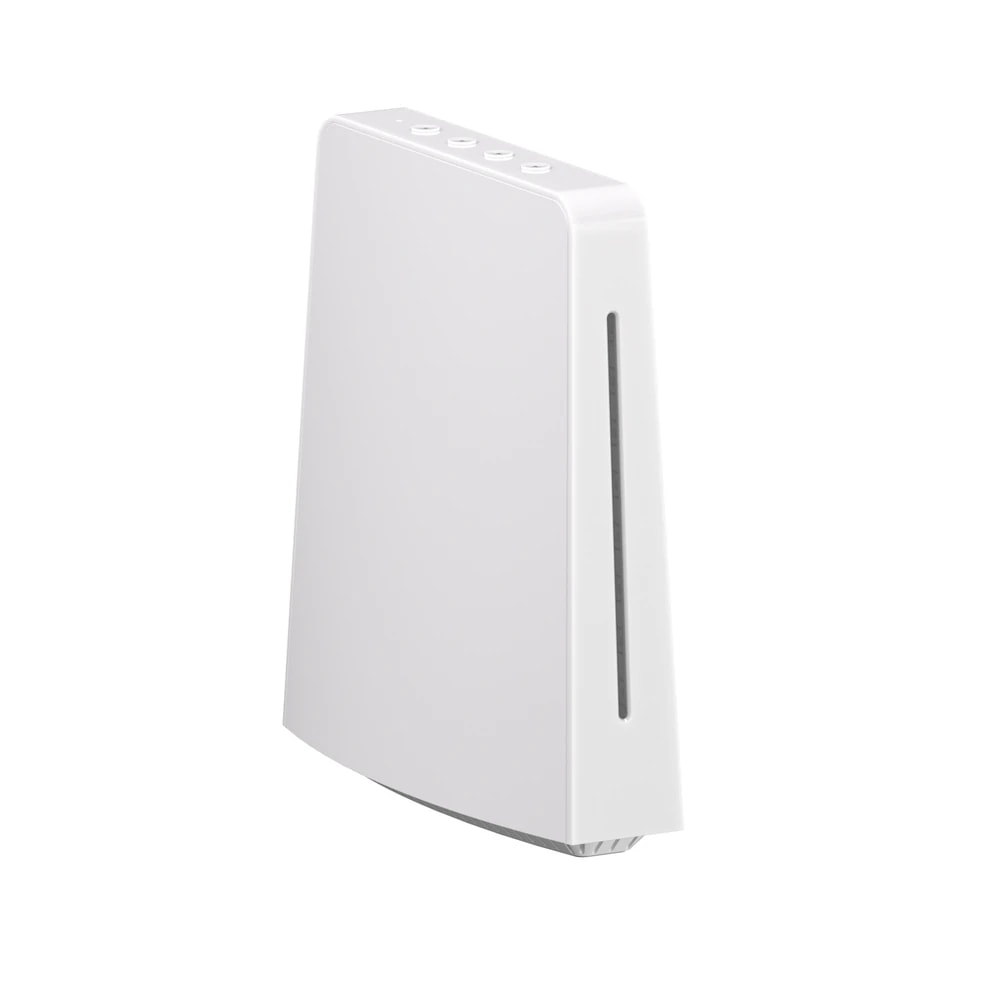
Sonoff iHost Smart Home Hub

A local smart home hub and Zigbee 3.0 gateway that keeps your automations running on the device itself, best suited to privacy-focused and hands-on users.

Wi-FiZigbeeMatterBluetoothWiredMid-range
Works with
Amazon AlexaGoogle HomeMatterManufacturer app
AED 430

Typical noon.com price for the device, checked 10 Sept 2026. See the listing Installation is quoted separately after we check your property.

Enquire on WhatsApp
Enquire on WhatsApp

Supplied, fitted and configured by our own Dubai team. We check compatibility with your property before you commit to anything.

Overview

What it is and where it fits

The Sonoff iHost is a smart home hub that runs its own private server inside your home. It pairs Zigbee 3.0 devices directly and also acts as a Matter controller and bridge, so it can pull different brands into one system. The big difference from most Sonoff gear is that iHost does not depend on the cloud. Your devices, scenes, and automations live on the hub itself, so switches and sensors keep responding over your local network and Zigbee even when the internet drops. You set it up through a local web console on your LAN, and the eWeLink app works too. It links to Alexa and Google Home through Matter, and technical users can connect it to Home Assistant using a community add-on. Because it supports an open API and Docker containers, you can add extra features or build your own. In a Dubai home this suits an owner or long-term tenant who wants control and privacy, not a quick plug-and-play setup. A villa can use its Zigbee router function to push signal further across floors. Apartment users get a tidy local hub for lights, sensors, and plugs. Be honest about the fit. iHost rewards people who enjoy tinkering. If you just want an app that works out of the box with no learning curve, a simpler hub will feel easier. There is no monthly fee, and it runs on a normal USB-C supply.

  • Runs a private local server, so scenes and Zigbee devices keep working when the internet is down.
  • Built-in Zigbee 3.0 radio pairs up to 128 devices and extends range across a villa.
  • Matter controller and bridge that links Alexa and Google Home.
  • Open API and Docker support for Home Assistant and custom add-ons.
Technical

Specifications

Model iHost

ProcessorRockchip RV1126 quad-core ARM CPU with built-in NPU
Memory4GB DDR4 RAM
Storage8GB eMMC internal, expandable via microSD card up to 256GB
Zigbee radioZigbee 3.0 (Silicon Labs EFR32MG21), manages up to 128 Zigbee/LAN sub-devices, works as a Zigbee range-extending router
Connectivity2.4GHz WiFi, Bluetooth LE, 10/100Mbps Ethernet (RJ45), USB-A 2.0
Protocols and ecosystemMatter controller and bridge; works with Alexa and Google Home; eWeLink app; Home Assistant integration; Open API and Docker container support for add-ons
Power input5V/2A via USB Type-C
Dimensions and weight12 x 13.5 x 4.1 cm, 360 g
In Dubai homes

What to check before you order

Dubai power is 220-240V on Type-G sockets. The iHost runs on 5V through a USB-C adapter, so you plug the supplied cable into any standard UAE charger or wall socket. Keep it indoors in air-conditioned space. Summer heat and fine dust are hard on electronics, and this hub has no fan, so give it a shelf with airflow and away from direct sun near a window. For a villa, run an Ethernet cable from your router to the iHost if you can. Wi-Fi across two or three floors can be patchy, and a wired link keeps the hub steady. The Zigbee radio also works as a router, helping signal reach far bedrooms and the majlis. In an apartment, Wi-Fi is usually fine. Both UAE listings we found ship through the same marketplace seller, Kepler Electronics, and noon lists a two-year seller warranty. There is no DEWA approval needed since it is a low-voltage plug-in device. Ask us and we handle setup and support locally.

Sonoff in the UAE. Budget tier on the eWeLink platform, widely stocked in UAE online retail in UK plug and wall-switch variants.

Answers

Questions about the Sonoff iHost Smart Home Hub

What exactly is the Sonoff iHost?
Chevron down icon
It is a smart home hub with a built-in Zigbee 3.0 radio. It also acts as a Matter controller and bridge. The key point is that it runs a private server on the device itself, so your devices and automations are stored and controlled locally rather than in the cloud.
Contact us
Contact us
Is the iHost right for my Dubai villa?
Chevron down icon
Yes, it fits villas well. Its Zigbee radio doubles as a router, so signal reaches far bedrooms, upper floors, and the majlis once you add a few mains-powered Zigbee devices along the way. For the steadiest link, connect the hub to your router by Ethernet rather than Wi-Fi.
Contact us
Contact us
Does it work in an apartment too?
Chevron down icon
Yes. For a one or two bedroom apartment, Wi-Fi to the hub is usually enough, and one iHost easily covers the space. Zigbee sensors, plugs, and lights all pair directly. Apartment tenants like that it leaves no permanent marks and moves with you.
Contact us
Contact us
Do I need a monthly subscription?
Chevron down icon
No. There is no subscription and no monthly fee. Because the iHost stores your devices, scenes, and automations on the hub itself, you are not paying for a cloud plan. You buy it once and run it.
Contact us
Contact us
Does it need the internet to work?
Chevron down icon
Not for daily control. Zigbee devices and local automations keep running over your home network even if your internet drops. You only need a connection for remote access when you are away from home, and for some cloud based voice commands through Alexa or Google.
Contact us
Contact us
Which app do I use?
Chevron down icon
You set up and manage the iHost through its own local web console on your network, which opens in a browser. The eWeLink app also connects to it for phone control and Sonoff devices. Many technical users add Home Assistant on top through a community add-on.
Contact us
Contact us
Does it work with Alexa and Google Home?
Chevron down icon
Yes. The iHost bridges to Alexa and Google Home through Matter, so you can control connected devices by voice. Set up the Matter bridge, then link it in the Alexa or Google Home app. Voice commands run through those services and need internet.
Contact us
Contact us
Does it work with Apple Home?
Chevron down icon
The iHost is a Matter bridge, and Apple Home supports Matter, so many users expose devices to Apple Home this way. Support depends on the current firmware and the specific devices. If Apple Home is essential for you, ask us first so we can confirm your setup before you buy.
Contact us
Contact us
How many devices can it handle?
Chevron down icon
The built-in Zigbee radio manages up to 128 Zigbee or LAN sub-devices. That is plenty for a full villa of lights, sensors, plugs, and switches. Mixing in a few mains-powered Zigbee devices also strengthens the mesh, so the far corners of the home stay reliable.
Contact us
Contact us
Will it cope with Dubai heat and dust?
Chevron down icon
Keep it indoors in cooled space and it is fine. Like any small computer, it does not like direct sun through a window or a sealed hot cupboard. It has no fan, so leave a little airflow around it. Dust it now and then, the same as your router.
Contact us
Contact us
What power does it use, and does it fit UAE plugs?
Chevron down icon
It runs on 5V and 2A through a USB-C cable. Plug that into any standard UAE Type-G charger or wall socket at 220-240V. Running cost is tiny, similar to leaving a phone charger working, so you can keep it on all year without worry.
Contact us
Contact us
Who sets it up?
Chevron down icon
You can do the basic setup yourself if you are comfortable with a web console and pairing devices. It rewards patience. If you would rather not, our team can install it, connect your Zigbee devices, build your scenes, and hand it over ready to use.
Contact us
Contact us
Is it noisy?
Chevron down icon
No. The iHost has no fan and no moving parts, so it makes no sound. You can place it in a bedroom or majlis without any hum. Just give it a spot with some air around it rather than boxing it in tightly.
Contact us
Contact us
What warranty and support do I get in the UAE?
Chevron down icon
The noon listing we checked states a two-year seller warranty, handled through the marketplace seller, Kepler Electronics. Buy through us and you also get local help with setup and questions, so you are not left working through an overseas support queue on your own.
Contact us
Contact us
How much does it cost and how do I buy from you?
Chevron down icon
UAE pricing starts around 430 AED based on the noon listing we tracked. Contact us for today's price, stock, and setup options. We can supply the hub on its own or fully configured with your Zigbee devices and scenes ready to go.
Contact us
Contact us
How does it compare to the Aqara Hub M2?
Chevron down icon
The Aqara Hub M2 is simpler and more plug-and-play, tied to the Aqara app and its ecosystem. The iHost is more open and private, with local storage, an open API, and Docker. Choose Aqara for easy setup, choose iHost if you want control and to tinker.
Contact us
Contact us
How does it compare to Homey Pro?
Chevron down icon
Homey Pro supports more radios out of the box, including Z-Wave and Thread, and has a polished app. The iHost is cheaper and focuses on Zigbee plus Matter with local hosting. If you need many protocols in one box, look at Homey Pro. For Zigbee and privacy on a budget, iHost fits.
Contact us
Contact us
Can I use Home Assistant with it?
Chevron down icon
Yes. Technical users run Home Assistant on the iHost through an open-source community add-on, since the hub supports Docker containers and an open API. This is a favourite reason people pick it. It is not official Sonoff software though, so treat it as a project for hands-on users.
Contact us
Contact us
Does it support Z-Wave or Thread?
Chevron down icon
No. The iHost has Zigbee 3.0, Wi-Fi, Bluetooth, and Ethernet, but no Z-Wave and no built-in Thread radio. It reaches other systems mainly through Matter and Zigbee. If your devices are Z-Wave, this is not the right hub, and you would want a different one.
Contact us
Contact us
Can I expand its storage?
Chevron down icon
Yes. It has 8GB of internal eMMC storage and a microSD slot that takes cards up to 256GB. The extra space is handy if you run add-ons, keep local logs, or store data on the device instead of a cloud service.
Contact us
Contact us
Who should not buy the iHost?
Chevron down icon
If you want a hub that just works from an app in five minutes with no learning, skip it. It suits people who enjoy setting things up and value local control. Beginners who want the simplest experience are usually happier with a more guided hub like the Aqara M2.
Contact us
Contact us
Is my data private with the iHost?
Chevron down icon
That is its main selling point. Because devices, scenes, and automations are stored and run on the hub over your local network, your daily automation data does not have to sit in a cloud account. This appeals to privacy-focused users who want their home data to stay at home.
Contact us
Contact us
Installation

Fitted and configured by our Dubai team

We supply this as part of a working system rather than as a box. That means checking it suits your property first, fitting it properly, setting up the automations that make it useful, and showing your household how it works.

See Voice Control & AI
Chat Now